

Chaos Engineering for Kubernetes
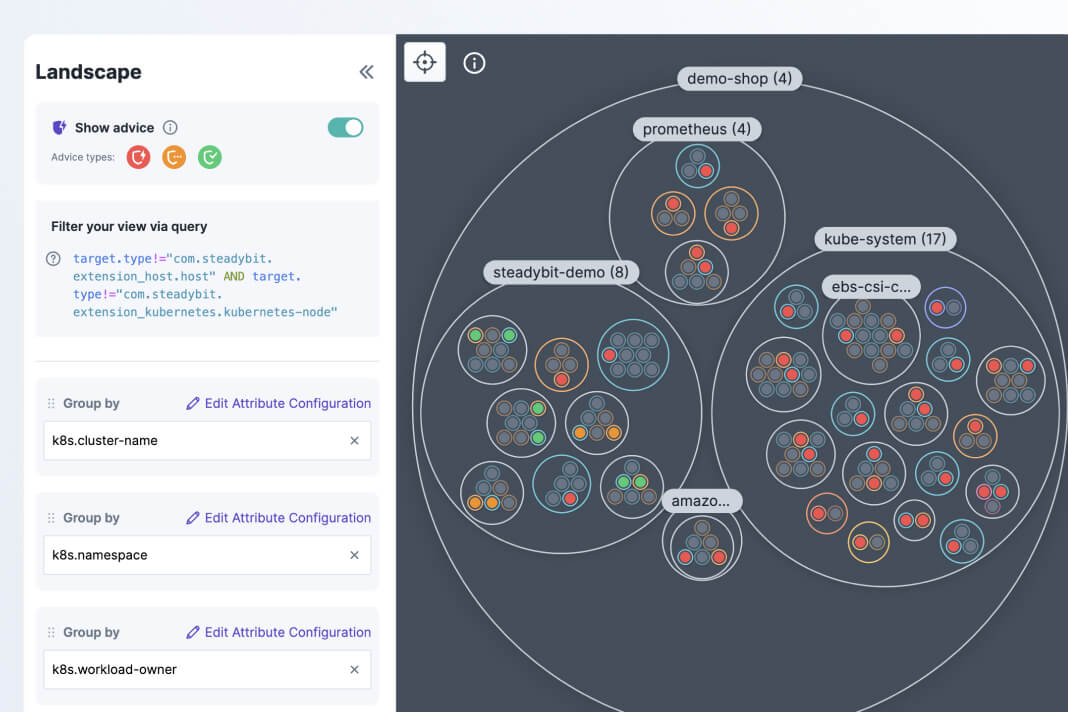
Scan for common Kubernetes reliability weaknesses
There are over a dozen configuration best practices for Kubernetes that can set your systems up for optimal reliability.
Steadybit continually scans your testing environments to flag common vulnerability and recommend fixes. You will also see recommendations for what experiments to run to test the potential impact of outstanding issues or validate fixes.
This Reliability Advice is made up of 13 out-of-the-box checks, based on the open source kube-score tooling. If you want to add additional checks for any internal standards, you can write your own with our AdviceKit.
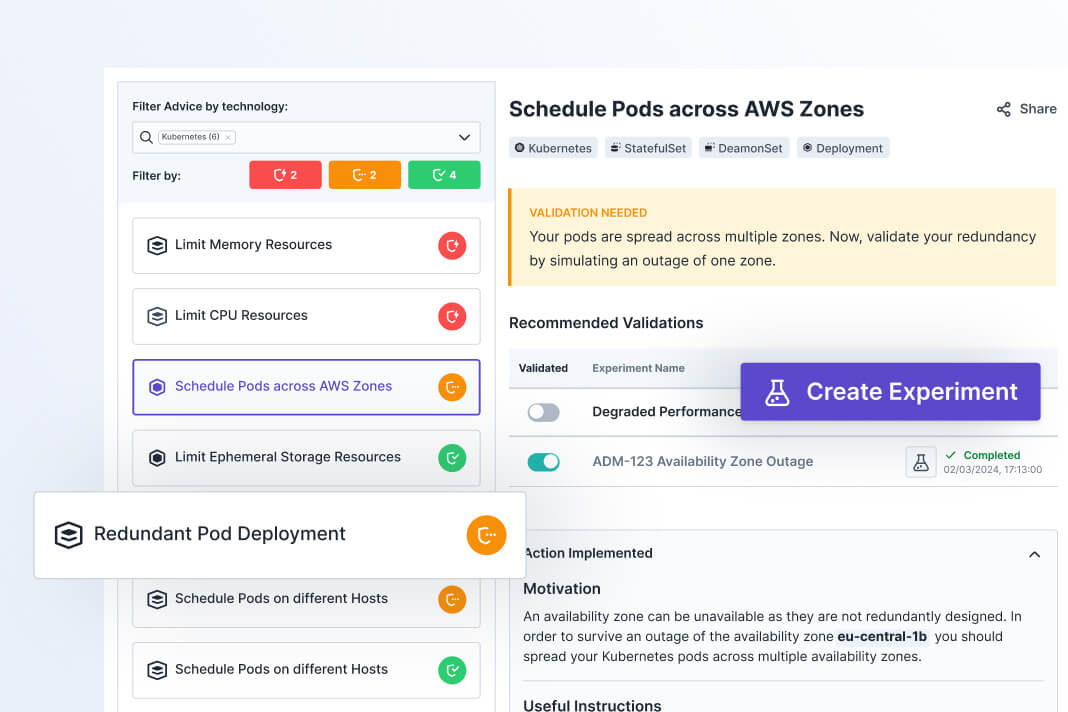
Validate potential risks with recommended chaos experiments
When Advice detects a potential reliability weakness, it may recommend that you run an experiment to validate whether it actually poses a performance risk to your system. If you want test it out, Steadybit will provide you with a full experiment template so you don’t need to spend time scripting and building from scratch. Just review that the targeting is correct and the attack parameters look right and start your experiment.
If your experiment is completed successfully, you’ll see that the issue is resolved.
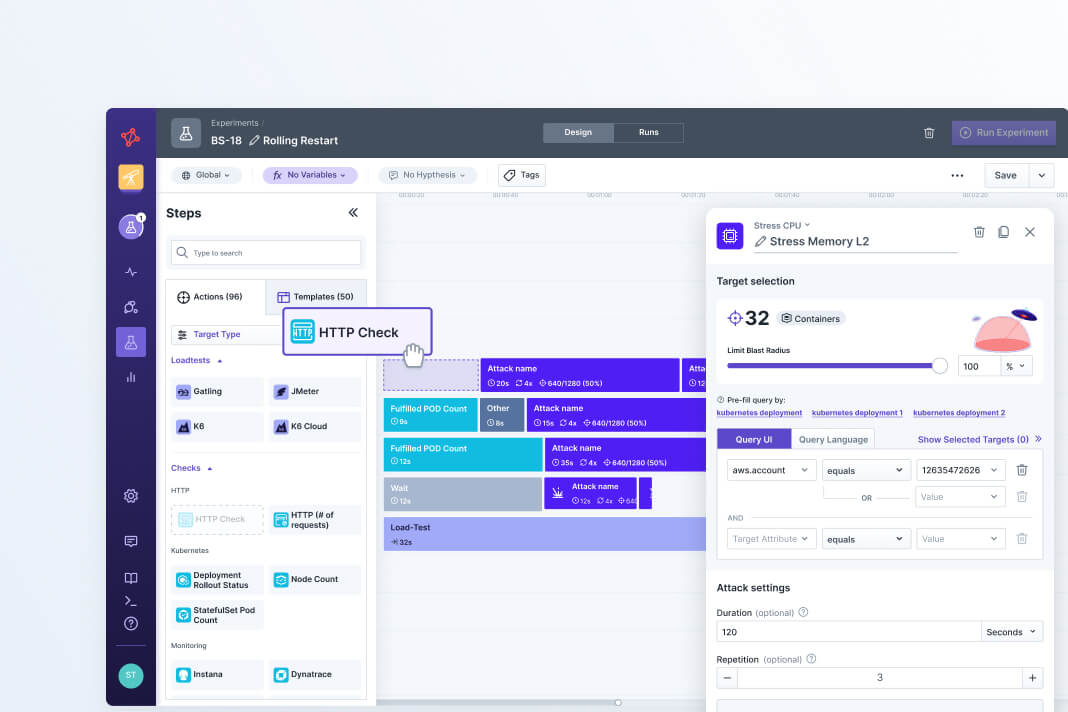
Map out your performance limits with reliability tests
Build confidence in your systems by proactively finding breaking points under a variety of conditions. For example, you could a test to see how your Kubernetes deployments handle a surge in load combined with additional latency injected. Drain nodes or stress CPU to see where your application’s performance degrades beyond your SLOs.
By mapping your break points, you can better anticipate failures. Prioritize this type of testing for your most critical services and make strategic changes to ensure graceful degradation and high availability.
Find Easy Reliability Wins in Steadybit
In this quick walkthrough, you can tour the Steadybit platform and see exactly how accessible reliability testing can be.
Build reliability experiments for Kubernetes
Use no-code fault injections and health checks to stress test the reliability of your Kubernetes systems.
Attacks
Checks
Targets
Integrations

Cause Crash Loop
Continuously kill all (or a given) container in a selected pod.
Block DNS
Blocks access to DNS servers for a specific duration.
Block Traffic
Drops all network traffic (IN/OUT/FORWARDED).
Corrupt Outgoing Packages
Cause packet loss for matching outgoing network traffic.
Delay Outgoing Traffic
Inject latency into all matching egress traffic.
Drop Outgoing Traffic
Cause packet loss for matching outgoing network traffic.
Fill Disk
Fill ephemeral storage with random data for a set duration.
Fill Memory
Allocates a specific amount of memory.
Limit Outgoing Bandwidth
Limits network bandwidth for all matching egress traffic.
Stress CPU
Generate CPU load for one or more cores.
Stress IO
Generate read/write/flush operation on disks.
Stress Memory
Stress memory with memory allocations, reads and writes.
Delete Pod
This attack allows you to delete one or multiple pods.
Drain Node
Use the attack to drain one or multiple nodes.
Block Traffic to NGINX Ingress
Block all traffic to a specific path in the ingress controller.
Delay Traffic to NGINX Ingress
Delay all traffic to a specific path in the ingress controller.
Block HAProxy Ingress Traffic
Block all traffic to a specific path in the ingress controller.
Delay HAProxy Ingress Traffic
Delay all traffic to a specific path in the ingress controller.
Pause Container
Pauses one or more container for a certain time.
Rollout Restart Deployment
Simulate the rollout of a Kubernetes deployment.
Scale Deployment
Up or downscale a Kubernetes deployment.
Scale ReplicaSet
Up or downscale a Kubernetes ReplicaSet.
Scale StatefulSet
Up or downscale a Kubernetes StatefulSet.
Set Image
Change the image of a Kubernetes Deployment.
Stop Container
Terminates one or more containers.
Taint Node
Use this attack to taint one or multiple nodes via kubectl taint.
Trigger Restart Argo Rollout
Patch spec.restartAt to trigger a restart of an Argo Rollout.
Trigger Shutdown Host
This action executes a shutdown on the host.
DaemonSet Pod Count
Check if the count of ready pods is matching your expectation.
Deployment Pod Count
Check if the count of ready pods is matching your expectation.
Deployment Rollout Status
Check the rollout status of the deployment.
Node Count
Check if the count of ready nodes matches expectation.
ReplicaSet Pod Count
Check if the count of ready pods is matching your expectation.
StatefulSet Pod Count
Check if the count of ready pods is matching your expectation.
Kubernetes Event Logs
Collect event logs from a selected kubernetes cluster.
Kubernetes Deployment
Kubernetes Cluster

Kubernetes Pods

Kubernetes Daemonsets

Kubernetes Nodes
Kubernetes ReplicaSets
Kubernetes Stateful Sets

NGINX Ingresses

HAProxy Ingresses
Argo Rollouts

AWS Elastic Container Service (ECS) on EC2 or Fargate
Container orchestration service
AWS Elastic Kubernetes Service (EKS)
Kubernetes service by AWS
Azure Kubernetes Service (AKS)
Kubernetes service by Microsoft
containerd
Open source tool for managing container runtime
CRI-O
Lightweight container engine for Kubernetes
Docker
Popular open source container service provider
Google Kubernetes Engine (GKE) & GKE Autopilot
Kubernetes service by Google
HA Proxy
Open source load balancer and proxy for applications
Kubernetes
Popular open source container orchestration platform
minikube
Open source tool that runs a single-node Kubernetes clusters
NGINX
Popular open source Ingress controller for Kubernetes
Red Hat OpenShift
Enterprise Kubernetes platform for containerized applicationsSteadybit makes chaos engineering easy for teams
With one platform, you can detect issues automatically and run experiments to validate system behaviors.
Learn how to run chaos experiments for Kubernetes with Steadybit
Read MoreSee how Advice in Steadybit makes it easy to adhere to reliability best practices for Kubernetes.
Read MoreSee an example of running a specific experiment for Kubernetes with Steadybit.
Read More
Use open source extensions to deploy across technologies
Steadybit has a hybrid architecture that enables open source customization. With open source extensions for popular technologies in the Reliability Hub, it’s easy to roll out chaos engineering across systems.
- Support for any configuration: Cloud, Multi-cloud, On-Prem, Air-gapped, Kubernetes, VMs, Serverless, Service Mesh, Message Brokers, etc.
- Inject faults and run health checks at the network, resource, and application layers
- Visualize your systems and group targets with discovered metadata
Get a Personalized Demo
Ready to hear more about Steadybit?
Schedule a demo with our team to see a platform walk-through and get your questions answered.